
This code will allow you to add a new tabs inside the Product Datas to your woocommerce product trough the WordPress Media Library
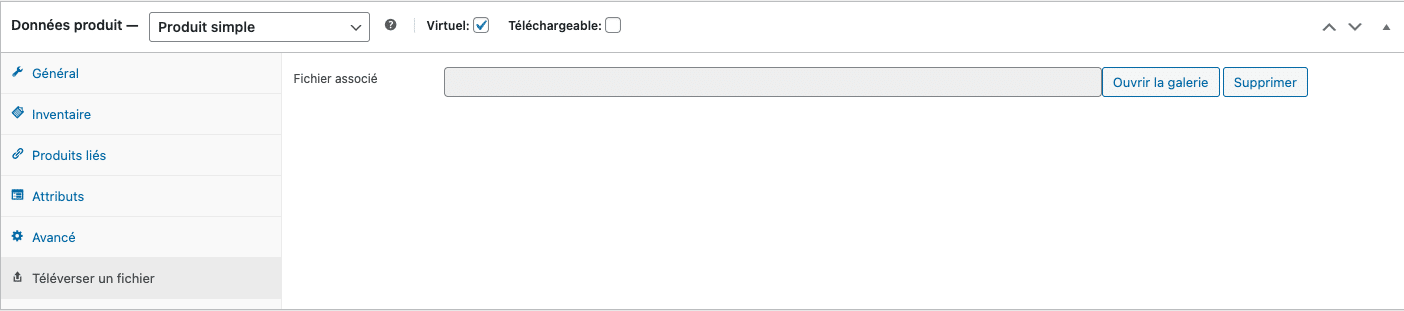
Then, when your customers will place an order and when the order will be processing, they will receive the file inside the email. On the body of the mail and also in attached file.
Great, no ? 🙂

Here is the full code of the plugin
					<?php
/*
Plugin Name: File upload per product and send in order email
Description: Adds a tab to upload a file in the product data and sends it as an attachment for "processing" orders, and adds a download link in the confirmation email.
Version: 1.0
Author: <a href="https://josselynjayant.fr">Josselyn jayant</a> & <a href="https://wycan.fr">WYCAN</a>
*/

if ( ! defined( 'ABSPATH' ) ) {
    exit; // Exit if accessed directly.
}

// Ajouter l'onglet
add_filter('woocommerce_product_data_tabs', 'add_upload_file_tab', 50, 1);
function add_upload_file_tab($tabs) {
    $tabs['upload_file'] = array(
        'label' => __('Téléverser un fichier', 'woocommerce'),
        'target' => 'upload_file_options',
        'class'  => array(),
    );
    return $tabs;
}

// Ajouter le contenu de l'onglet
add_action('woocommerce_product_data_panels', 'upload_file_tab_content');
function upload_file_tab_content() {
    global $post;
    $file_url = get_post_meta($post->ID, '_uploaded_file', true);
    ?>
    <div id='upload_file_options' class='panel woocommerce_options_panel'>
        <div class='options_group'>
            <p class="form-field _uploaded_file_field">
                <label for="_uploaded_file_url"><?php _e('Fichier associé', 'woocommerce'); ?></label>
                <input type="text" class="short" style="width:70%;" name="_uploaded_file_url" id="_uploaded_file_url" value="<?php echo esc_url($file_url); ?>" readonly />
                <button id="upload_file_button" class="button"><?php _e('Ouvrir la galerie', 'woocommerce'); ?></button>
                <button id="delete_file_button" class="button"><?php _e('Supprimer', 'woocommerce'); ?></button>
            </p>
        </div>
    </div>
    <script type="text/javascript">
        jQuery(document).ready(function($){
            var custom_uploader;

            $('#upload_file_button').click(function(e) {
                e.preventDefault();

                if (custom_uploader) {
                    custom_uploader.open();
                    return;
                }

                custom_uploader = wp.media.frames.file_frame = wp.media({
                    title: 'Sélectionner un fichier',
                    button: {
                        text: 'Sélectionner ce fichier'
                    },
                    multiple: false
                });

                custom_uploader.on('select', function() {
                    attachment = custom_uploader.state().get('selection').first().toJSON();
                    $('#_uploaded_file_url').val(attachment.url);
                });

                custom_uploader.open();
            });

            $('#delete_file_button').click(function(e) {
                e.preventDefault();
                $('#_uploaded_file_url').val('');
            });
        });
    </script>
    <?php
}

// Sauvegarder le fichier quand le produit est sauvegardé.
add_action('woocommerce_process_product_meta', 'save_uploaded_file_url');
function save_uploaded_file_url($post_id) {
    if(isset($_POST['_uploaded_file_url'])) {
        update_post_meta($post_id, '_uploaded_file', esc_url($_POST['_uploaded_file_url']));
    }
}

// Ajouter le fichier en pièce jointe à l'e-mail "processing"
add_filter('woocommerce_email_attachments', 'attach_file_to_processing_email', 10, 3);
function attach_file_to_processing_email($attachments, $email_id, $order) {
    if ($email_id === 'customer_processing_order') {
        $items = $order->get_items();

        foreach ($items as $item) {
            $product_id = $item->get_product_id();
            $file_url = get_post_meta($product_id, '_uploaded_file', true);

            if ($file_url) {
                $file_path = get_attached_file(get_attachment_id_by_url($file_url));
                if ($file_path) {
                    $attachments[] = $file_path;
                }
            }
        }
    }
    return $attachments;
}

// Ajouter le lien de téléchargement dans l'e-mail de confirmation
add_action('woocommerce_email_after_order_table', 'add_file_link_to_order_email', 10, 4);
function add_file_link_to_order_email($order, $sent_to_admin, $plain_text, $email) {
    if ($email->id == 'customer_processing_order') {
        $items = $order->get_items();

        foreach ($items as $item) {
            $product_id = $item->get_product_id();
            $file_url = get_post_meta($product_id, '_uploaded_file', true);

            if ($file_url) {
                echo "<h2>Fichier lié à votre produit : " . $item->get_name() . "</h2>";
                if ($plain_text) {
                    echo "Télécharger: " . $file_url . "\n";
                } else {
                    echo "<a href='" . esc_url($file_url) . "'>Télécharger</a><br>";
                }
            }
        }
    }
}

// Fonction pour récupérer l'ID d'une pièce jointe depuis son URL
function get_attachment_id_by_url($url) {
    $id = attachment_url_to_postid($url);
    if ($id) {
        return $id;
    }
    return false;
}

// Ajouter l'icône "dashicons-upload"
function custom_admin_style() {
    echo '<style>
        #woocommerce-product-data ul.wc-tabs li.upload_file_options a:before {
            font-family: "dashicons";
            content: "\f317";
        }
    </style>';
}
add_action('admin_head', 'custom_admin_style');
