
This little piece of code will allow us to have a quick view based on a date range to display the number of orders placed on our site based on our customers’ countries.
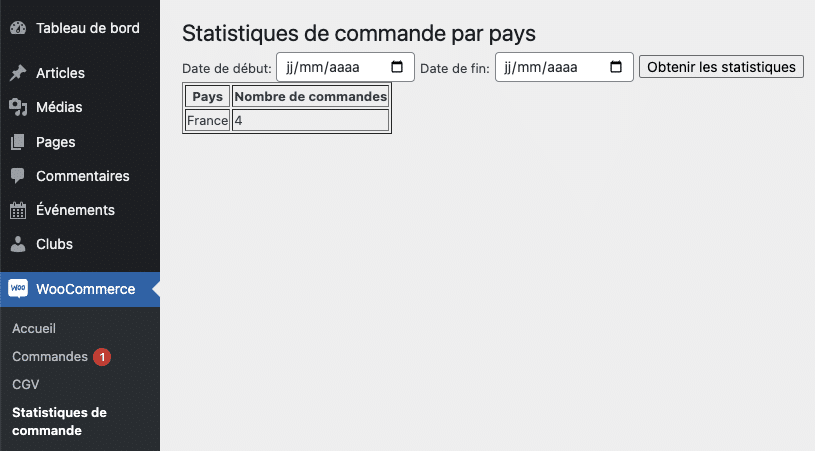
					// Ajout du sous-menu dans le menu de WooCommerce
add_action('admin_menu', 'custom_order_stats_submenu');

function custom_order_stats_submenu(){
    add_submenu_page('woocommerce', 'Statistiques de commande', 'Statistiques de commande', 'manage_options', 'custom-order-stats', 'custom_order_stats_page');
}

function custom_order_stats_page(){
    ?>
    <div class="wrap">
        <h2>Statistiques de commande par pays</h2>

        <form method="post" action="">
            <label for="start_date">Date de début: </label>
            <input type="date" name="start_date" required>

            <label for="end_date">Date de fin: </label>
            <input type="date" name="end_date" required>

            <input type="submit" value="Obtenir les statistiques">
        </form>

        <?php
        if(isset($_POST['start_date']) && isset($_POST['end_date'])){
            display_order_stats($_POST['start_date'], $_POST['end_date']);
        }
        ?>
    </div>
    <?php
}

function display_order_stats($start_date, $end_date){
    global $wpdb;

    $sql = $wpdb->prepare("
        SELECT pm.meta_value AS country_code, COUNT(p.ID) AS order_count
        FROM {$wpdb->posts} p
        JOIN {$wpdb->postmeta} pm ON p.ID = pm.post_id
        WHERE p.post_type = 'shop_order'
        AND p.post_date BETWEEN %s AND %s
        AND pm.meta_key = '_billing_country'
        GROUP BY pm.meta_value
        ORDER BY order_count DESC", $start_date, $end_date);

    $results = $wpdb->get_results($sql);
    $countries = WC()->countries->countries;

    if($results){
        echo '<table border="1">';
        echo '<tr><th>Pays</th><th>Nombre de commandes</th></tr>';
        foreach($results as $row){
            $country_name = isset($countries[$row->country_code]) ? $countries[$row->country_code] : $row->country_code; // Si le code du pays n'est pas reconnu, affichez le code.
            echo '<tr><td>' . $country_name . '</td><td>' . $row->order_count . '</td></tr>';
        }
        echo '</table>';
    }else{
        echo '<p>Aucune commande trouvée pour cette période.</p>';
    }
}

2 Responses
I’ll right away clutch your rss as I can’t find your email subscription link
or e-newsletter service. Do you’ve any? Please allow me realize in order that I could
subscribe. Thanks.
Hi,
No i dont want to use a newsletter service or any emailing systems.